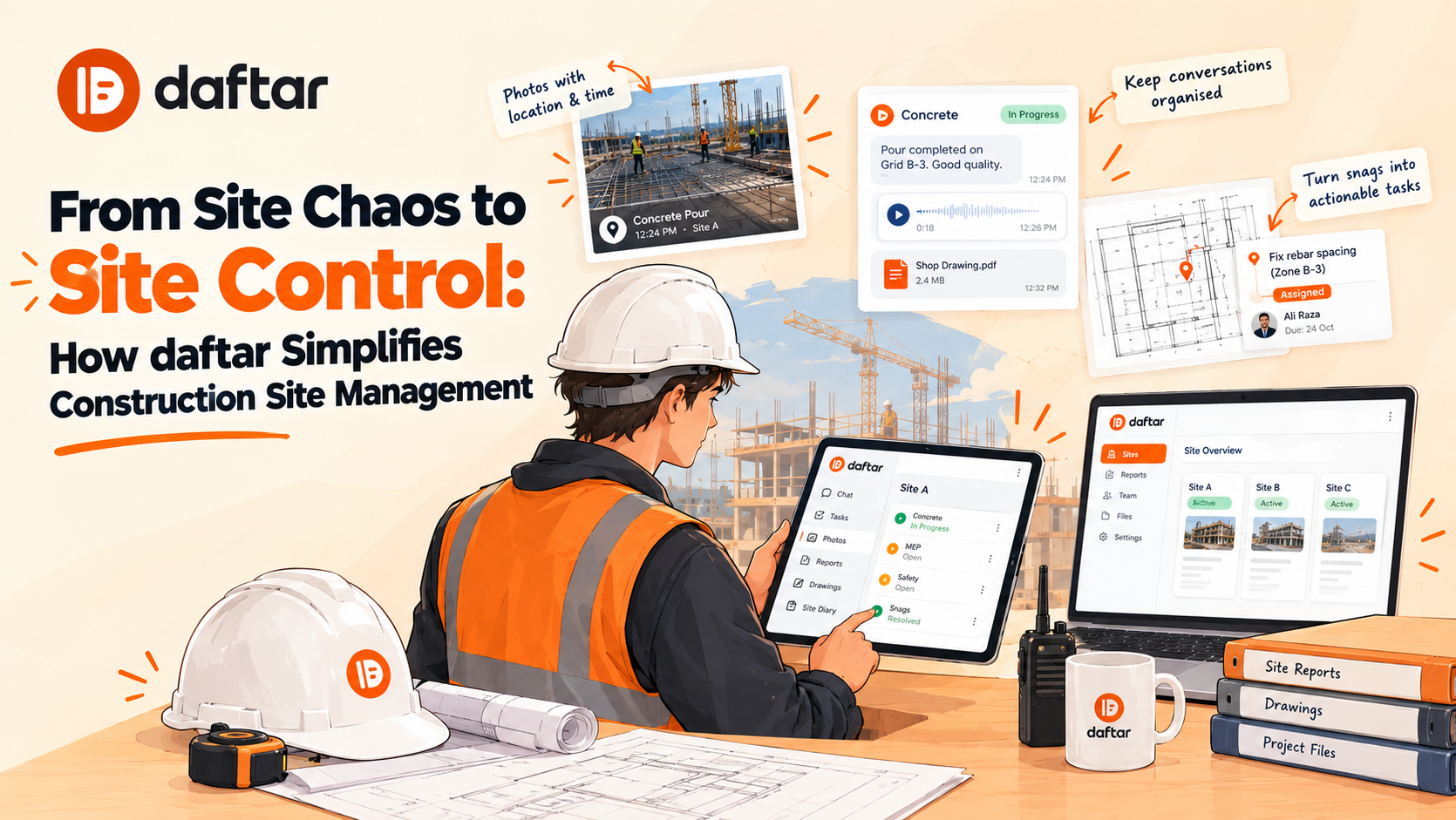
You shouldn't have to spend your evening chasing site updates, scrolling through WhatsApp messages, or wondering whether a reported issue was ever fixed.
Yet that's the reality for many contractors and project managers. Photos get buried in chat groups, instructions disappear in voice notes, and daily reports remain incomplete because nobody has time to piece everything together.
A construction site management app helps solve this by bringing site communication, photos, tasks, and daily reports into one place.
That's exactly what daftar does. It helps contractors, site engineers, supervisors, and project managers coordinate field teams, track site activities, and keep project records organised, so they spend less time chasing updates and more time moving work forward.
What Is daftar?
daftar is a construction site management app that helps site teams and office staff manage communication, reporting, tasks, and project documentation in one place.
The app combines mobile tools for field teams with a web dashboard for office staff, bringing everyday site activities into one connected system.
Here's what teams can use daftar for:
-
Site communication: Organise conversations by project and topic, and share photos, files, and voice notes.
-
Voice-note transcription and translation: Turn spoken updates into text and translate them into the reader's preferred language.
-
Daily reporting: Complete site diaries, progress reports, inspections, safety checks, and delivery records.
-
Task and snag management: Assign work, set deadlines, and document completed tasks with supporting photos.
-
Drawings and documents: Keep project files, permits, drawings, and revisions organised.
-
Site photos: Keep visual evidence connected to relevant project information.
-
Offline working: Save messages, photos, and reports on the phone and synchronise them when connectivity returns.
You can explore the full range of daftar construction site management features to see how they fit into a typical site's daily routine.
These tools work together to give teams a clearer record of site activities, outstanding issues, and project updates.
Why Construction Teams Need More Than Another Group Chat
Messaging apps are part of everyday construction work because they're quick and familiar. A supervisor can share a photo in seconds, and an engineer can explain an issue without walking across the site.
But as a project gets busier, useful information becomes harder to find. A decision might be buried under dozens of messages. A photo might show a defect without making clear who needs to fix it. When it's time to prepare the daily report, someone may have to reconstruct the day's activities from scattered conversations.
It's not that WhatsApp or spreadsheets are inherently bad. The challenge is relying on them for everything without a consistent way to connect the information.
Important updates get lost in the noise
A busy construction group can contain delivery updates, site photos, technical questions, instructions, and casual conversations all mixed together. Finding an earlier instruction or confirming what was agreed can become a job in itself.
Daily reporting takes longer than it should
If a supervisor waits until the end of the day to complete a report, they may have to remember which activities took place, find the right photographs, and check messages for missing details.
Small issues turn into follow-up problems
Someone reports a snag, another person acknowledges it, and everyone assumes the matter is being handled. At the next site meeting, the same issue may still be open.
Without a clear owner, deadline, and record of completion, even a straightforward task can require repeated follow-ups.
Office teams spend too much time chasing information
Project managers need progress updates, outstanding tasks, information about delays, and access to relevant records. If getting those answers means calling several supervisors every afternoon, there's room for a more organised process.
For a broader look at this problem, read our related article, From Site Chaos to Site Control: How daftar Simplifies Construction Site Management. It explores how construction teams can bring scattered conversations, paper diaries, and site records into a more consistent workflow.
How daftar Brings Teams, Reports, and Tasks Together
The value of a construction site management app becomes clearer when you look at an ordinary working day.
Imagine a site engineer notices that a section of installed work needs correcting. They take a photo, explain the problem, and identify what needs to change. The project manager needs to follow up, while the office team needs an accurate record of the day's work.
With daftar, communication, reporting, and task management sit within the same project environment.
1. Keep site conversations organised
Construction teams exchange information about work sequences, delivery schedules, drawing revisions, inspections, safety concerns, and instructions from clients or consultants.
daftar lets teams organise conversations by jobsite and topic. They can share photos, files, and voice notes, making it easier to keep discussions connected to the relevant work.
Language can also be a challenge. A supervisor might explain an issue in a voice note, while another team member prefers reading instructions in a different language.
daftar supports voice-note transcription and translation into the reader's language. This helps multilingual teams understand spoken updates and refer back to the written text.
Explore the chat tools for construction sites to learn more about organising site conversations.
2. Make daily reporting part of the working day
Daily reports record what happened on-site. They can cover work completed, manpower, materials, equipment, deliveries, delays, and other events relevant to a project.
daftar lets teams complete digital reports from their phones, including site diaries and other project records.
Reports can be signed on-site, numbered, and exported as PDFs. Each exported report includes a QR code recipients can scan to verify that the copy matches the signed original.
Recording information closer to when the work happens can help teams avoid reconstructing the day from memory later.
3. Turn reported problems into assigned tasks
Reporting a problem is only the first step. Someone still needs to fix it.
With daftar, teams can pin a snag to a PDF drawing, add a description, assign an owner, and set a due date. This links the issue to its location and clarifies responsibility.
The process is straightforward:
-
Record the problem and identify its location.
-
Add a description and relevant photo.
-
Assign responsibility and a deadline.
-
Complete the required work.
-
Attach completion evidence and review the task's status.
Instead of relying on someone to remember a conversation, the team has a record of what needs to happen and who is responsible.
4. Keep site photos and project records connected
Construction photos can be important evidence when reviewing progress, investigating a problem, or confirming the condition of work.
daftar automatically stamps site photos with details such as the time, location, and floor, helping teams understand where and when an image was taken.
This gives project teams more context when reviewing visual records later. Rather than treating every photograph as an isolated image, teams can connect evidence to the relevant jobsite and its activities.
5. Give office teams a clearer view of site activity
Site supervisors and office teams have different responsibilities, but they rely on the same project information.
A supervisor needs to record what happened and keep work moving. A project manager needs to review progress, check outstanding issues, and coordinate resources.
daftar's web dashboard helps office teams access relevant conversations, reports, tasks, and documents. They can review available information and identify what needs attention without starting every follow-up with a phone call.
The software won't remove the need for meetings or conversations. But when the underlying records are easier to find, those conversations can be more focused.
What Makes daftar Different From Traditional Construction Workflows?
There are plenty of tools that handle individual parts of construction management. Some focus on scheduling, others on document control, and others on reporting or communication.
daftar takes a connected approach to everyday site work, bringing several of those activities into one environment.
|
Capability
|
How it helps on-site
|
|
Organized site conversations
|
Makes project discussions and instructions easier to find
|
|
Voice-note transcription and translation
|
Helps multilingual teams understand spoken updates
|
|
Digital site reports
|
Gives teams a consistent way to record daily activities
|
|
Drawing-based tasks and snags
|
Connects issues with locations, owners, deadlines, and completion evidence
|
|
Project documents and photos
|
Keeps relevant information organized and accessible
|
|
Offline working
|
Allows messages, photos, and reports to be saved when connectivity is unavailable and synchronized when it returns
|
Unlike workflows that keep communication, reporting, and task management separate, daftar connects these activities to the relevant jobsite. Teams can also verify signed reports using QR codes and export records in PDF, Word, and Excel formats.
You can find more information about daftar's integrations and data-export options.
Why organised construction records matter
Construction records are useful long after the day's work has finished.
A project manager may need to investigate a delay. A contractor may need to confirm when work was completed. An engineer might need to check an inspection record or find the photograph associated with an earlier issue.
Consistent documentation gives teams something more reliable to work from than memory alone.
For an additional perspective, Autodesk's construction daily reporting guide discusses the role of daily records in documenting site activity.
Who Can Benefit From daftar?
Contractors managing multiple sites
When several projects are running at once, getting a reliable picture of each site can be difficult. A more organised record of conversations, reports, photos, and tasks helps managers review the information available for each jobsite.
Site engineers and supervisors
Engineers and supervisors handle inspections, technical questions, drawing-related issues, progress updates, and daily instructions. Recording reports on-site and assigning snags with clear deadlines gives them a practical way to document work and follow up.
Project managers and office teams
Project managers need to know what's complete, what's outstanding, and where follow-up is required. Office administrators also need access to reports and project records when preparing documentation for clients or internal reviews.
Subcontractors, consultants, and clients
Construction projects involve people from different companies. daftar supports guests, including clients and consultants, who can access the conversations they're invited to. This allows teams to share relevant information without automatically exposing every internal discussion.
You can also explore daftar's workflows for concrete, electrical, HVAC, and other construction trades to see how its tools relate to different types of site work.
How to Get Started With daftar
Introducing a new construction app doesn't mean changing every process overnight. In fact, starting small is often the more practical approach.
Here's how a contractor can begin.
Step 1: Choose one active site.
Pick a project where reporting delays, scattered conversations, or repeated follow-ups are causing problems.
Step 2: Bring the right people on board.
Start with the site supervisor, engineers, project manager, and office staff who need access to project information.
Step 3: Set up your reporting process.
Choose the reports your team uses most often, such as daily progress reports, site diaries, delivery records, or inspection checklists.
Step 4: Establish a clear process for tasks.
Agree on how snags will be recorded, who assigns responsibility, how deadlines are set, and what evidence is needed before a task is marked complete.
Step 5: Review how the process is working.
After a few weeks, look at whether reports are being submitted consistently, whether outstanding tasks are easier to track, and whether the team is spending less time chasing routine updates.
The aim is to solve real problems on-site, not introduce software for its own sake.
daftar offers onboarding assistance to help companies configure their sites, team members, and reporting forms. You can book a demo with daftar to discuss your current workflow and see whether the app fits your needs.
How Much Does daftar Cost?
daftar bases its pricing on the number of active jobsites rather than charging separately for every staff member.
The pricing model includes several practical points:
-
You pay for active jobsites.
-
You can add as many of your own staff as needed.
-
Guests, including clients and consultants, are free.
-
Sites on hold or marked as finished stop counting as active sites.
-
All seven tools are included rather than charged as separate add-ons.
For contractors with several team members working on the same project, this model may be worth considering because the number of employees doesn't automatically determine the price.
Actual costs depend on the company's requirements and the quotation provided by daftar. Check the official pricing page or contact the team for current rates and details.
Frequently Asked Questions About daftar
What is a construction site management app?
A construction site management app helps contractors and project teams coordinate site communication, record daily progress, manage tasks, organise documents, and share project information. daftar brings these activities together through mobile apps and a web dashboard.
What does the daftar construction app do?
daftar helps construction teams manage site conversations, photos, daily reports, tasks, drawings, and project documents. It also supports voice-note transcription and translation for multilingual teams.
Can daftar be used for daily construction reports?
Yes. daftar provides more than 30 report templates covering daily progress, site diaries, safety checks, quality inspections, deliveries, and other site activities. Teams can complete reports on their phones, customise templates, collect signatures, and share PDFs on company letterhead.
Does daftar work without an internet connection?
Yes. daftar supports saving messages, photos, and reports on the phone when connectivity is unavailable. They synchronise in order when the connection returns.
Can daftar help manage construction snags and defects?
Yes. Teams can pin a snag to a drawing, add a description and photo, assign responsibility, set a deadline, and attach completion evidence. This gives project managers a clearer record of what needs fixing and whether the work has been completed.
Can construction teams use daftar in different languages?
Yes. Team members can send voice notes in their own language, while others can read the transcribed and translated updates. Technical or safety-critical instructions should be checked before anyone acts on them.
Can clients and consultants access project information?
Yes. daftar supports invited guests who can access the conversations and documents shared with them. This allows contractors to share relevant project information while keeping other internal discussions separate.
Can daftar export construction reports?
Yes. daftar supports exporting reports in PDF, Word, and Excel formats. It also offers integration options, including an API for connecting site information with other business systems.
Is daftar suitable for contractors managing multiple sites?
daftar supports multiple job sites, with site-specific conversations, reports, tasks, and documents. Its web dashboard helps office teams access project information across sites, making it useful for contractors looking to standardise their reporting and coordination processes.
Bring Your Construction Site and Office Together With daftar
Construction projects generate information all day long.
A supervisor sends a voice note. An engineer records an inspection. Someone shares a photograph of a problem. A subcontractor completes a task, and the project manager needs confirmation that the work is finished.
Together, these activities form the record of how a project progresses. The challenge is keeping that information organised and making sure it reaches the people who need it.
daftar brings site communication, daily reporting, task management, drawings, and photos into one connected construction site management app. Its voice-note transcription and translation features also help multilingual teams understand site updates.
For contractors who are tired of chasing reports, searching through old messages, or asking the same questions twice, daftar offers a more organised way to manage everyday site activities.
Ready to bring your site teams, reports, and tasks together?
Book a demo with daftar to see how it can fit into your construction team's workflow.