How many WhatsApp groups run your construction sites?
In a 2018 survey of nearly 600 construction leaders by FMI and PlanGrid, poor communication and poor project data were behind 48% of rework on US construction job sites.
A foreman sends a photo of a concrete pour to a WhatsApp group. An engineer shares a drawing in another. Someone reports a snag in a voice note, but nobody records who needs to fix it or when.
This is where construction site management starts to break down. Instructions get buried in chats, photos lose their context, and daily reports turn into a scramble to piece together what happened on site. A task might be discussed several times without anyone being sure who owns it or when it needs to be completed.
And when you're managing several job sites, the problem multiplies. The office needs reliable updates, supervisors need clear responsibilities, and site teams need a simple way to record the work without slowing it down.
The answer isn't more WhatsApp groups or more paperwork. It's a better way to keep conversations, tasks, photos, and site records connected.
Why WhatsApp Groups Aren't Enough for Construction Site Management
WhatsApp is useful on a construction site. Teams already know how to send messages, share photos, and record voice notes. The problem starts when those chats become the project's main record system.
Important instructions get buried
A message about a concrete pour might sit between attendance updates, delivery questions, and unrelated photos. When someone needs to check the original instruction, they have to scroll through the conversation or ask someone to resend it.
That takes time, and there's always a chance someone picks up the wrong message.
Photos don't always tell the whole story
A photo might show a crack, a completed installation, or a delivery. But without the right context, the office may not know which jobsite it belongs to, when it was taken, or who sent it.
If the images are sitting on personal phones, gathering them for a progress report, payment discussion, or handover can turn into a job of its own.
Everyone knows about the snag, but who will fix it?
Someone spots a problem and shares a photo. The engineer acknowledges it. The conversation moves on.
A day later, the same snag is still there.
The missing piece isn't always communication. It's clear ownership. Someone needs to be responsible for the work, there needs to be a due date, and the team needs a way to follow the task through to completion.
Daily reports become an end-of-day scramble
When site diaries are filled in from memory, details can slip through the cracks. Manpower figures, completed activities, site conditions and outstanding issues all need to be checked before the report is ready.
It's harder to keep records consistent when every supervisor has a different way of doing things.
The office has to chase updates
When information is spread across chats, spreadsheets, paper forms, and personal phones, head office can't simply review the record. Someone has to call, message, or ask the site team to put everything together.
Across several projects, those small delays add up to a lot of chasing.
The solution isn't to add another tool just for the sake of it. It's to give the information your team already produces a proper place to live.
What Better Construction Site Management Looks Like
Good site management shouldn't mean asking foremen to spend half their day filling in forms. It should make it easier to capture the right details while the work is happening.
Good construction management software helps teams keep conversations organised, document site progress, assign responsibility, complete reports, and give office staff a clearer view of what's happening on site.
For example, a snag shouldn't stop at a photo in a chat. It should have an owner and a due date. A daily report shouldn't depend entirely on someone's memory at the end of a shift. And a photo should be connected to the jobsite it came from.
These things matter whether you're running one building project or coordinating several sites across different locations. They also make it easier to find the records you need when questions come up during claims, payment discussions, or handover.
How daftar Brings Site Communication, Tasks and Reports Together
daftar is a construction site communication app with an iPhone and Android app for site teams and a web dashboard for office staff. It brings jobsite conversations, stamped photos, reports, drawings, and work planning into one place.
Instead of relying on separate chats, paper diaries, and spreadsheets, teams can keep more of their day-to-day project information connected to the relevant jobsite.
You can explore daftar's construction site management features to see how it works.
1. Keep Site Conversations Organised by Topic
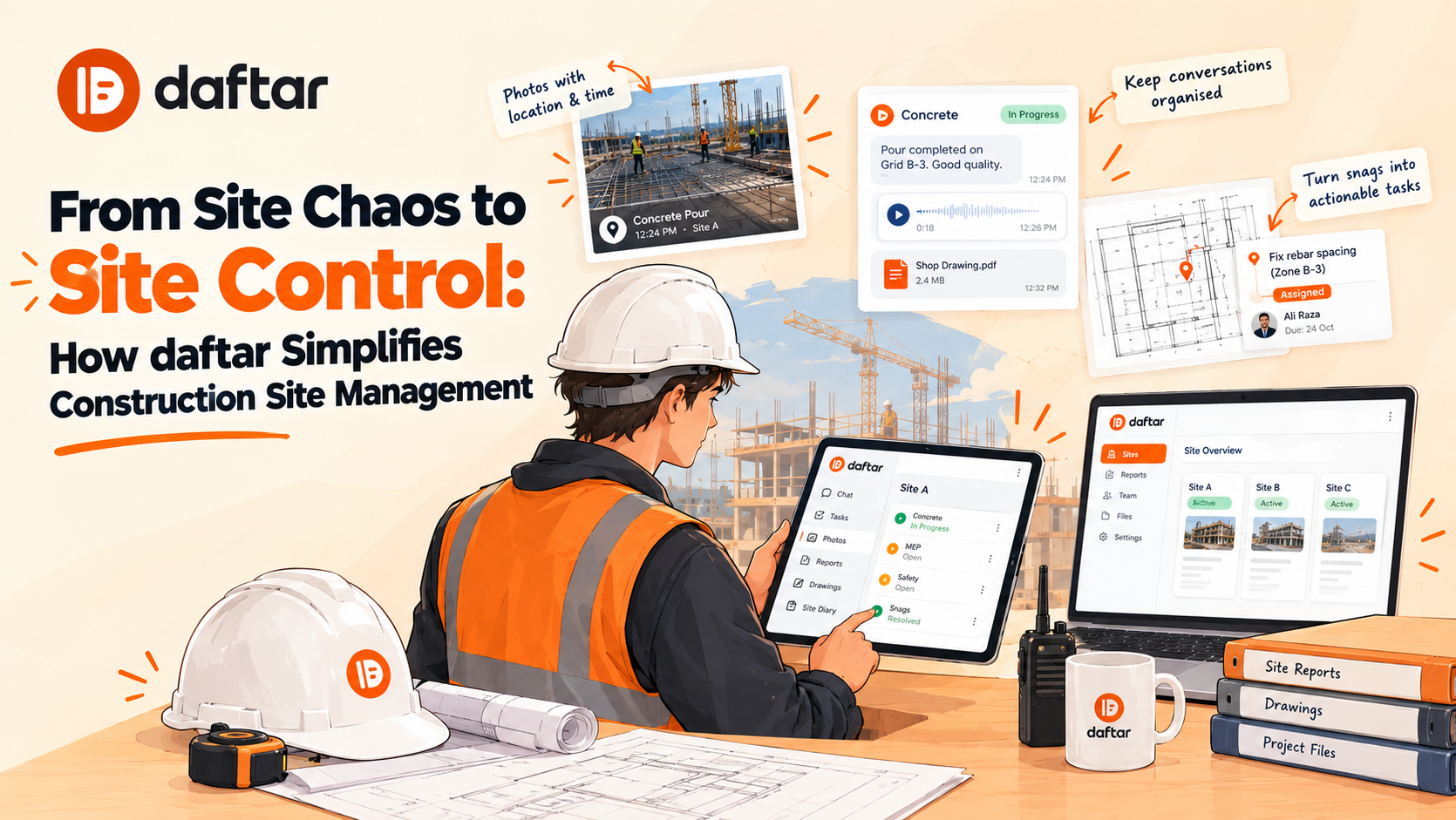
When every instruction goes into one WhatsApp group, finding an old discussion can be frustrating. daftar lets teams organise conversations by topic, such as Concrete, MEP, Safety, and Snags.

Each conversation can be marked Open, In progress, or Resolved, making it easier to see where an issue stands.
Teams can share messages, photos, files, and voice notes in the relevant conversation. Important decisions can also be pinned for easier reference.
Say an engineer spots a problem with the rebar before a pour. The discussion and related photos can stay together under the appropriate topic instead of getting lost among unrelated updates.
That gives the next person reviewing the issue more context than a forwarded photo or a message without an explanation.
2. Turn Voice Notes Into Written Notes and Translate Messages
Typing isn't always practical on a busy site. A foreman might be checking a delivery, walking through a building, or coordinating several trades at once. Recording a voice note is often easier.
With daftar, voice notes can be converted into written text. Messages and voice notes can also be translated with one tap, helping people communicate when they don't all speak the same language.
For example, a supervisor can explain a site issue in a language they're comfortable with, while another team member can read the translated message rather than struggle through an unfamiliar voice note.
Written text is also easier to scan when someone needs to find an instruction later.
For important site instructions, measurements, and technical details, it's still worth checking the written or translated version before acting on it. A transcription or translation can help communication, but it shouldn't replace a person's judgement.
3. Assign Work to Your Team Instead of Leaving It in the Chat
Reporting a problem is one thing. Making sure it gets fixed is another.
With daftar, a team can pin a snag or task directly onto a PDF drawing and turn it into assigned work. Each task can have a responsible person and a due date, so it's clear who needs to act and when.
Imagine an engineer spots a damaged finish on a particular floor. They can mark the location on the drawing, add a note, and assign the repair to the employee responsible.
The team can then follow the task through to completion. A stamped photo can be added as evidence of the finished work, with the task remaining connected to the original drawing pin.
There's less reliance on someone remembering an instruction from a conversation three days ago. The work has an owner, a deadline, and a place to check its status.
See how daftar helps teams organise drawing-based tasks.
4. Keep Site Photos With the Details That Matter
Construction photos can be useful evidence of completed work, defects, deliveries, and site conditions. But an image is much more useful when people know where it came from.

daftar stamps photos on the server with the date, time, GPS location, jobsite, and sender. Photos selected from a phone's gallery are labelled “From gallery”, so they're distinguishable from photos captured directly through the app.
The original photo is retained, too.
When a question comes up later about a snag or a stage of work, the team has more information to work with than an image saved somewhere on a personal phone. It's easier to connect the photo to the relevant jobsite and conversation.
5. Complete Daily Site Diaries and Reports on Site
Daily reports shouldn't depend entirely on someone trying to remember everything that happened at the end of a long shift.

daftar includes templates for site diaries, tasks, change orders, site inductions and punch lists. Teams can also use construction report templates for toolbox talks, permits to work, inspection requests and delivery notes.
Manpower planning is connected to the reporting process, too. Teams can plan manpower by person and day, and the site diary can be prefilled from that plan.
Reports can be signed on site with the signer's name, job title, date, and time. Reports are numbered, can be locked, and retain their revision history rather than simply disappearing when someone makes a change.
Each PDF page also carries a QR code. Scanning it lets someone check what the signed report says. If a printout has been altered, its contents won't match the report shown through the QR code.
For the office, that means less time trying to piece together records after the fact. For site staff, it provides a more structured way to document the day's work while the details are still fresh.
You can see the construction site reports and templates available in daftar.
6. Plan Manpower and Keep Drawings and Files Together
Daily work depends on knowing who's expected on site and having the right information available when it's needed.
daftar supports manpower planning by person and day. Because the site diary can be prefilled from the manpower plan, teams have a starting point for their daily records without having to enter every planned detail again.
Drawings and related files can also be kept with the relevant jobsite. When a drawing is updated, the latest revision becomes available to the team while older versions remain on record.
That gives site and office staff a more organised place to find the documents and records connected to a project.
7. Keep Recording Work When the Signal Drops
Anyone who's worked in a basement or inside a building under construction knows that mobile coverage can be unreliable.
daftar works without a signal. Messages, photos, and reports are saved on the phone and sent in order when connectivity returns.
Site teams can keep recording what's happening instead of waiting until they're back in a covered area to document the work.
8. Keep the Office, Clients and Consultants in the Loop
Site records aren't just for the people physically doing the work. Office staff need to review updates, and clients or consultants may need access to specific conversations.
daftar has a web dashboard for office teams, alongside its mobile apps for site staff. Clients, consultants and suppliers can join free as guests and see only the conversations they're invited to.
Records can be exported in PDF, Word, and Excel formats. On the Pro plan, a dossier export can also collect records for an entire jobsite for claims and handover.
This gives teams one place to find project information, so nobody has to juggle five WhatsApp groups and a spreadsheet just to find one report.
How to Start Improving Construction Site Management
You don't need to change how every project runs overnight. Start small, learn what works for your team, and build from there.
Choose one to three live jobsites. Pick projects where updates are scattered, daily reports take too long to prepare, or the office regularly has to chase information.
Appoint a site champion. A site engineer or supervisor can help the team set up conversations, report templates, and task assignments, then show others how to use them during the working day.
Agree on what needs to be recorded. Decide how your team will handle snags, daily reports, photos, and work assignments. Keep the process practical. If recording an update takes too much effort, people will be tempted to return to old habits.
Bring the office into the process. The people reviewing reports and coordinating multiple sites should help decide what information they need and how it should be recorded.
Review how the work is being tracked. After the pilot, look at whether tasks have clear owners, reports are being completed on site, and photos are easier to find. Use what you learn to improve the process before introducing it to more projects.
The point isn't to create more paperwork. It's to make the work your team already does easier to record, follow, and review.
Frequently Asked Questions
What is construction site management?
Construction site management involves coordinating daily activities, manpower, materials, communication, safety, quality checks, and progress reporting. It also means keeping reliable records of instructions, completed work, and outstanding tasks, so site teams and office staff can work from the same information.
How do you manage multiple construction sites?
Managing multiple construction sites starts with giving each team a reliable way to record progress, report issues, assign tasks, and document daily work. A shared system helps office staff review updates without chasing supervisors across calls, WhatsApp groups, and spreadsheets. daftar supports this with jobsite conversations, drawing-based tasks, manpower planning, site reports, and a web dashboard for office teams.
Can daftar help teams assign and track work?
Yes. Teams can turn a snag pinned on a PDF drawing into a task, assign a responsible person, and set a due date. They can follow the task through to completion and add a stamped photo as evidence of the finished work.
Can site teams use daftar without an internet connection?
Yes. Messages, photos and reports can be saved on the phone when there's no signal. They are sent in order when connectivity returns.
Can daftar help teams that speak different languages?
Yes. Voice notes can be converted into written text, and messages and voice notes can be translated with one tap. Team members should still check important technical details before acting on a transcription or translation.
Give Your Site Records a Better Home
Construction sites generate instructions, photos, reports, and decisions all day long. When those records are scattered across chats, paper diaries, and personal phones, even a simple question can take too long to answer.
Better construction site management starts with a straightforward change: keep information connected to the job, make responsibility clear, and record important details while the work is happening.
daftar brings jobsite communication, task assignment, photos, manpower planning, and reports together, with mobile apps for site teams and a web dashboard for the office.
New to daftar? Meet daftar and see how it helps construction teams keep site communication and records connected.
Want to see how it could fit your projects? Book a demo of daftar.
daftar — The site's record, kept.