React Native allows businesses to build mobile applications for both iOS and Android using a single codebase. It helps teams launch products faster and reduce development costs. However, as an application grows in users, features, and data volume, many teams start facing performance issues, maintenance challenges, and slow release cycles.
Scaling React Native is not only about handling more users. It is about ensuring that the application remains fast, stable, and easy to extend as the product evolves. This guide explains the best architecture patterns, performance techniques, and automation strategies used to scale React Native applications successfully.
Why Scaling React Native Matters
As your app gains more users, its data processing, API calls, and UI complexity increase. Without scalable architecture, teams often face UI lag, memory issues, frequent crashes, and long development cycles. Proper scaling strategies ensure long-term maintainability, better performance, and faster feature delivery.
Best Architecture Patterns for Large React Native Apps
-
Should I use monorepo or multi-repo for React Native?
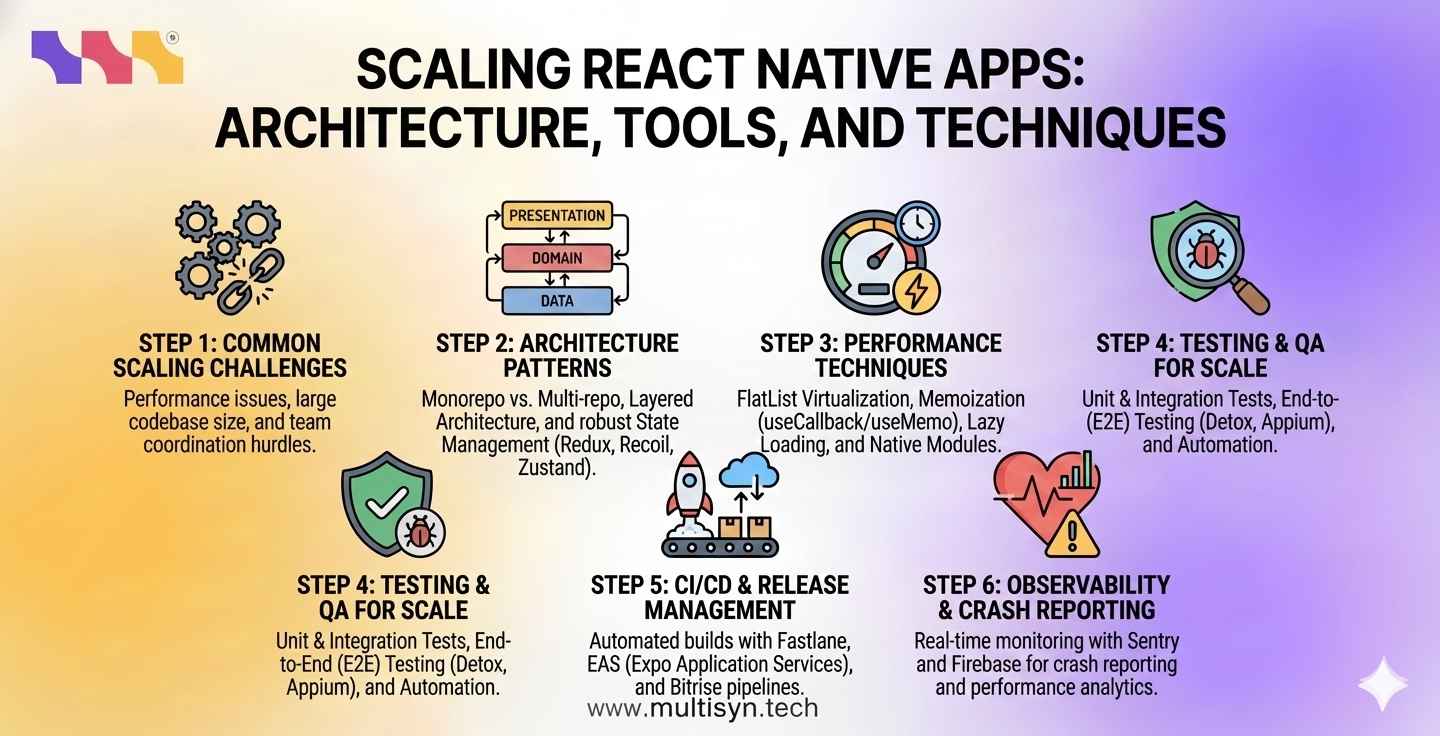
For most growing startups and enterprises, monorepo architecture is the preferred choice. A monorepo allows teams to store mobile apps, shared components, and API libraries in a single repository. This improves code reuse, simplifies dependency management, and reduces integration issues. Multi-repo structures offer isolation, but often slow down cross-team collaboration.
-
What is the best folder structure for large React Native apps
Large React Native applications perform better when organized using a layered architecture. The presentation layer handles UI and navigation. The domain layer contains business logic and validation rules. The data layer manages APIs, caching, and local storage. This structure keeps the codebase clean and easy to maintain.
-
How does React Native's new architecture improve performance
The new React Native architecture introduces JSI, TurboModules, and Fabric. These technologies allow faster communication between JavaScript and native code, reducing UI lag and improving animation and rendering performance. Apps using modern libraries such as Reanimated and Skia benefit greatly from this architecture.
State Management for Scalable React Native Apps
-
Which state management is best for large React Native apps
Redux Toolkit with RTK Query is widely used for managing complex domain state and API caching in enterprise applications. React Query is preferred for apps that rely heavily on server data. Zustand and Recoil are lightweight alternatives suitable for managing UI focused state.
-
Can I combine Redux and React Query?
Yes. Many production-scale apps use Redux for business state and React Query for server data caching and background syncing. This hybrid approach improves performance and keeps state management simple.
Performance Optimization Techniques
-
Why is my React Native app slow when scrolling lists
Large lists often cause UI lag due to improper virtualization. Using optimized list rendering strategies and limiting the number of rendered items significantly improves scroll performance and memory usage.
-
How can I reduce React Native app startup time?
Startup time can be reduced by enabling Hermes, using inline require,s and loading feature screens only when they are required. Avoid loading large libraries during initial app launch.
-
Should I use native modules for better performance
Yes. Performance-intensive tasks such as animations, media processing and encryption should be handled using TurboModules or native threaded libraries. This prevents blocking the JavaScript thread and improves UI responsiveness.
Testing and Quality Assurance
-
What is the best testing strategy for React Native apps
Use unit testing for business logic, integration testing for components, and end-to-end testing for real user flows. Automated testing ensures bugs are detected before releases and reduces regression issues.
CI CD and Release Automation
-
How can I automate React Native builds and releases
Fastlane helps automate app signing, building, and store uploads. Expo Application Services provides cloud builds and over-the-air updates. Platforms such as Bitrise and GitHub Actions are used to automate testing and deployments.
Monitoring and Crash Reporting
-
How do I track React Native crashes in production
Sentry provides detailed JavaScript error logs and performance monitoring. Firebase Crashlytics reports native crashes and app stability metrics. Using both tools gives full visibility into runtime issues.
Conclusion
Scaling React Native apps requires careful planning, modern architecture, and automated pipelines. By adopting layered architecture, efficient state management, optimized rendering, and real-time monitoring, businesses can scale their mobile products smoothly and reliably.
Multisyn provides professional React Native development services that help companies build scalable, high-performance mobile applications.
Frequently Asked Questions
How do I make my React Native app faster?
Use Hermes, optimize list rendering, offload heavy logic to native threads, and implement proper caching strategies.
What is the best CI CD tool for React Nativ?e
Fastlane, combined with Bitrise or GitHub Actions, is widely used for production-grade automation.
Does React Native support enterprise-level scaling
Yes. Many enterprise applications use React Native successfully with modern architecture and proper tooling.
Is React Native good for long-term projects?
Yes. With proper architecture and performance practices, React Native is suitable for long-term, scalable products.